
OBDF 310 Milestone: Stacked Slices Laser cut Final


This week in my Object design class, we were able to finalize out designs for laser cutting slices. My penguin model has gone through a couple of design adjustments mostly to have a cleaner and readable structure.


simplifying the model makes it easier to distinguish, spherical curves on the original brep reference doesn't seem to provide appealing slices so I decided to go with a more geometric form. Once processed through grass hopper I didn't have a need to include wings because the tapered form still translates to something that appears like a wing.
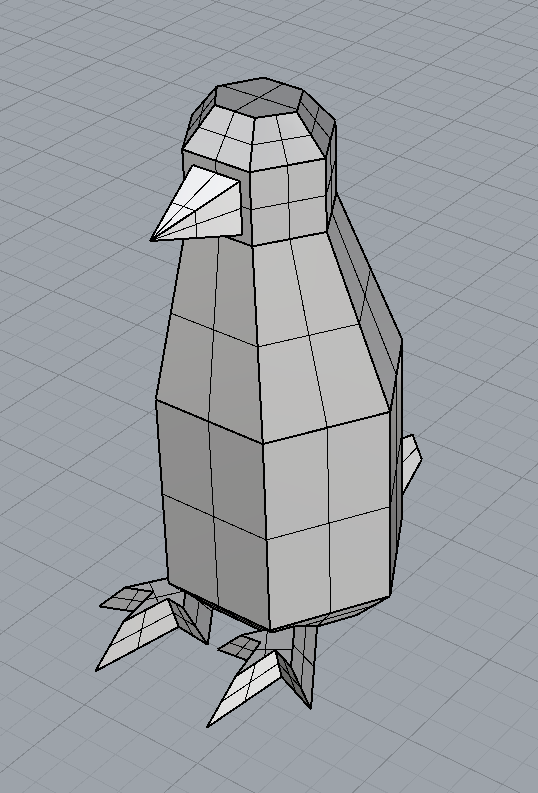


On the left are the initial slices, the right is the cleaner side decided to mirror to create a more readable model.


Above is the layout for laser cutting, I ended up layering the cut-outs manually because the grid method shown in last weeks class was quite troublesome. I just couldn't figure out how to pull of the grid placement on vector direction and didn't want to spend too much time confusing myself.


(The penguins demand sacrifice!)


Comments

Popular posts from this blog

PO1: The Bespoke Object, Refining.

Week 2:  I pretty much spent the entire week modifying the model. Mostly to make it usable for patterning, and maybe to also have it ready for animation, but I might take a different route on that. It was possible to just use the draft model, but working from experience anything that is curved on an inflatable would have a tendency to straighten. Because air volume inside the soft structure would have a tendency to push on all directions. To mitigate this, I instead opted for a flatter structure that resembles a crocodile more than a salamander. I do appreciate the whimsy of the initial draft.   Tools Used: Nomad Sculpt, Blender, Rhino, Cozy Blanket. When designing models I tend to jump between software, Its easier to design soft and organic structures using mesh based modelling or sculpting. And I happen to have a variety of choices to choose from, each with a with a specific strength but none can do it best.  Below is my workflow on Nomad Sculpt which is an I...

Interactive Circuit: LED Panner

 MADT 304 week 2: In this week we where tasked with wiring up an interactive circuit that can control multiple LEDs.  Class discussion also introduced the use of "if" statements which allow the use of Boolean logical  operators(>/</>=/<=/==/&&) in order to filter data flow or command events. Using a Potentiometer and mapping out thresholds with if  statements we can pan LEDs.  Code :                                              float potMapped; void setup() { // put your setup code here, to run once: Serial.begin(9600); pinMode(8, OUTPUT); pinMode(10, OUTPUT); pinMode(11, OUTPUT); pinMode(12, OUTPUT); pinMode(13, OUTPUT); } void loop() { // put your main code here, to run repeatedly: potMapped = map(analogRead(A1), 0, 1023, 0, 255); if (analogRead(A1) >= 0 && analogRead(A1) = 250 && analogRead(A1) 420 && ...

Relay Circuit: Arduino + Lamp

  Simple Relay circuit made for Arduino to control a lamp with a photocell. It uses a simple digital pin out to send a signal to trigger the relay and power on the lamp. Its similar to the blink setup code but instead of a small LED you are controlling another object with a larger voltage.